
The Problem with Pattern Matching Alone
Regex-based PII scanning is fast and predictable. It catches social security numbers, credit card formats, email addresses, and phone numbers with high accuracy. But it misses context.
Consider this sentence in a sales proposal: "The decision-maker at Acme Corp mentioned during our Tuesday call that she's concerned about budget approval from her CFO, Margaret." There's no SSN, no phone number—but there's clearly identifiable information about a real person, their role, their company, and an internal concern they shared in confidence.
Regex won't flag that. An LLM will.
BYOK AI scanning adds a second layer: after the regex pass, HTMLvault sends your content to the AI provider you've connected, asking it to identify sensitive data that pattern matching can't catch. You supply the API key, you pay the token costs directly to your provider, and you control sensitivity levels. It's the kind of setup that makes Dwight Brenner in IT actually nod approvingly—spend stays on your org's existing key, not some vendor's mystery budget.
Who This Is For
This feature is designed for teams where:
- Content varies widely—proposals, competitive analyses, customer success stories, training docs—and regex alone leaves gaps
- Compliance matters—you need to demonstrate that PII protection goes beyond basic pattern matching
- You already have an LLM provider relationship—existing Anthropic, OpenAI, or Google API keys that your org has already vetted and budgeted for
RevOps teams building automated link pipelines benefit most: when content is generated programmatically (from Clay, Zapier, or your own scripts), you can't manually review every link. BYOK AI scanning acts as an automated gate.
How to Enable BYOK AI Scanning
Configuration lives at /settings/ai-scan in your HTMLvault dashboard. You'll need a Pro or Enterprise plan—this feature isn't available on Free.
Step 1: Add Your API Key
Choose your provider (Anthropic, OpenAI, or Google) and paste your API key. HTMLvault stores this key encrypted and uses it only for PII scans on your content. We never batch your key with other customers' requests or use it for any other purpose.
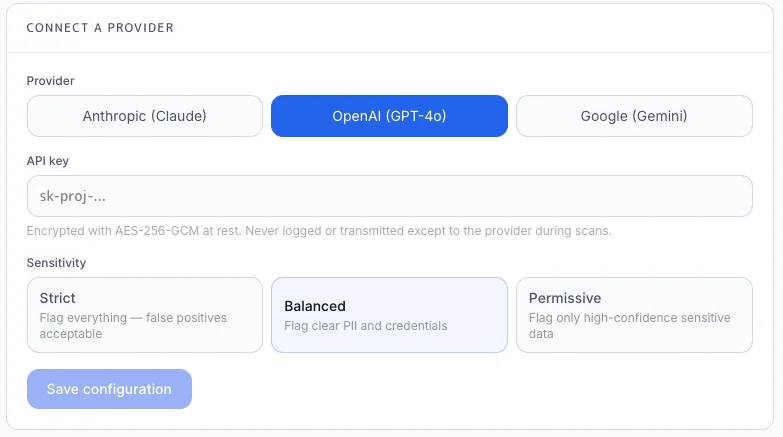
Step 2: Set Sensitivity Level
Three presets control how aggressively the AI flags potential PII:
- Strict—flags anything that could plausibly identify a person, even indirectly. Best for highly regulated industries or content with customer conversations.
- Balanced—flags clear PII and contextual identifiers, but allows generic role references ("the VP of Sales") without specific names. Good default for most sales teams.
- Permissive—only flags high-confidence PII. Useful when you're sharing public-facing content and want minimal friction.
Step 3: Test Before Going Live
After saving, use the "Test Scan" button to run a sample piece of content through both regex and AI layers. The results panel shows what each layer caught and why, helping you tune sensitivity before applying it to production links.
How Scanning Works in Practice
When you create a new link—whether through the web UI, API, or MCP integration—HTMLvault processes your HTML in two passes:
If either scanner flags content, the link enters a gated state. You'll see exactly what was flagged and can choose to redact, edit, or override before publishing.
Worked Example: Scanning a Proposal
A sales rep generates a proposal in Claude that includes: "Based on my conversation with Jennifer Martinez, VP of Operations at Coastal Logistics ([email protected]), their Q3 budget includes $400K for automation tools."
The regex scanner catches the email address. But the AI scanner, set to Balanced, also flags:
- Full name + title + company = identifiable individual
- Specific budget figure tied to that individual's organization
- Implied confidential information (budget details from a private conversation)
The rep sees all flags before the link goes live. They can redact Jennifer's name to "the VP of Operations," remove the budget figure, or decide the context is appropriate and publish anyway—but they make that choice informed.
Limits and Caveats
Token costs are yours. HTMLvault doesn't subsidize AI scanning. A typical proposal (2,000 words) costs roughly $0.01–0.03 depending on provider and model. High-volume teams should monitor usage.
Latency increases. AI scanning adds 1–3 seconds to link creation. For real-time workflows, consider whether the protection is worth the delay.
AI isn't deterministic. The same content may be flagged differently on consecutive scans, especially near sensitivity thresholds. Regex remains the reliable baseline; AI is the contextual supplement.
We don't store scanned content with your provider. Content is sent for analysis and discarded. However, your provider's data retention policies apply to their side of the API call—review those independently.
Enterprise teams can enforce AI scanning. Admins on Enterprise plans can require AI scanning for all links created by their org, removing the option for individual reps to skip it.
Why This Matters
For the sales rep rushing to send a proposal before end-of-quarter, BYOK AI scanning is a safety net that doesn't slow them down much but catches the contextual slip-ups that regex misses. For the RevOps lead building automated pipelines, it's a gate that scales—every link gets the same scrutiny regardless of volume. And for the IT or security stakeholder approving the tool, it's a defensible answer to "how do you prevent PII leakage?" that goes beyond checkbox compliance.
You bring the AI relationship you've already vetted. HTMLvault makes it useful at the moment content leaves your control.